
The tests and the HTML report are where AI-written database code becomes visible. Generate them, run them against the real database, and read exactly what each function does before you trust it.
Community Edition. You wrote a function, or an assistant did. One command generates the tests, runs them, and writes a report you open in the browser.
UNITAUTOGEN_DSN or the PG* variables.unitautogen --schema public --html report.html --out unit_testsreport.html. Every function is there with its coverage; click one for its per-test results and annotated source.The assistant that wrote the function can check its own work against the report, but only if you tell it to, step by step.
UNITAUTOGEN_DSN or the PG* variables.After you add or change any PL/pgSQL function, run this and wait for it to finish.
unitautogen --schema public --json report.json --html report.html --out unit_tests
Then read report.json. For every function you touched:
1. Confirm its branch coverage is 100 percent.
2. Open its generated test in unit_tests/ and read the value each branch returns.
3. If a branch is uncovered, or a returned value is not what I asked for, change
the function and run the command again.
Never edit or delete the generated tests to make them pass. When you are done, tell me
which functions you changed, their coverage, and any behaviour in the report I should confirm.report.json, you open report.html to see the same thing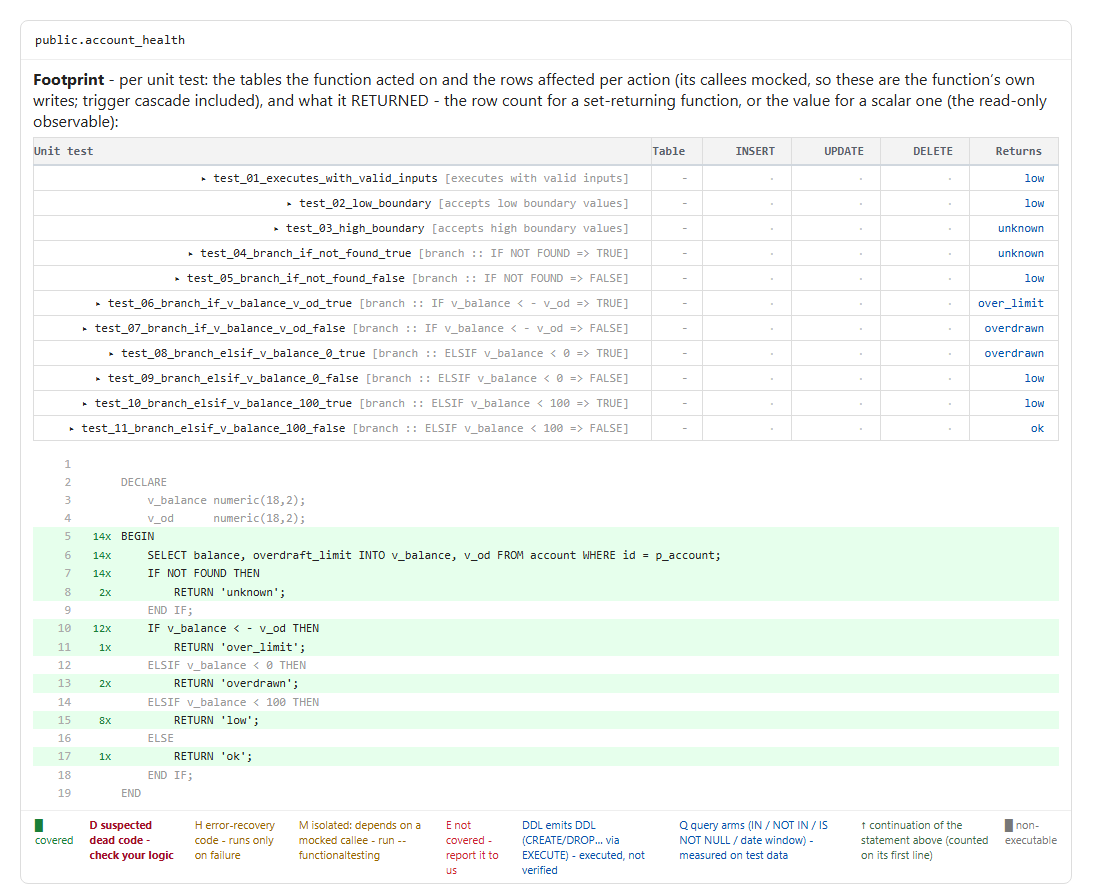
You did not write the function, so you cannot hold its behaviour in your head, and the model's own summary of what it did is one more guess.
This is transparency, not a gate. It shows you what the AI produced. Once you have looked and you trust it, the same generated tests become your regression guardrail, so the next change that moves that behaviour fails before production.
The platform points you to local pgTAP tests you run and read as you build.
supabase test db for immediate pass or fail. UnitAutogen writes those tests for you and adds the coverage report. Supabase, Testing overview →