The everyday command, and the default. unitautogen --schema public runs it with no command word, and unitautogen unit also works. For each function and procedure it generates a full set of pgTAP tests, runs them and measures how much of the routine they exercised. Then it does the same for your triggers. Community Edition, free.
unitautogen --schema public --out unit_tests --html report.html --json report.jsonEvery routine gets these tests.
Triggers are tested by behaviour. The test fires the INSERT, UPDATE or DELETE and asserts what the trigger did.
test_<routine>.sql per function in <out>/unit/<schema>/functions/test_trg_<schema>__<table>__<trigger>.sql, in <out>/unit/<schema>/triggers/<out>/unit/--html and --json point, plus run_summary.json for the run--out defaults to unitautogen_tests/. Set TG_EMIT_FLAT=1 for the old flat layout.--schema a,b the schemas to cover--like pat a name filter--out DIR where the test files go--html PATH the HTML report--json PATH the machine-readable summary--report or --no-report the CI bundle, on by default--no-coverage generate and run only, faster--include-extension also test extension-owned routinesOn Supabase, unitautogen --supabase --schema public writes to supabase/tests/seccover/unit/, where supabase test db runs it. See Supabase mode.
A list with one object per routine. A representative entry follows.
{
  "proc": "public.salesbycategory",
  "tests": 7,
  "status": "ok",
  "branch_coverage": 1.0,
  "statement_coverage": 1.0,
  "tests_passed": 6,
  "tests_failed": 0,
  "tests_skipped": 1,
  "pruned": [],
  "uncovered_classes": {}
}
7 tests were generated. 6 pass and 1 is skipped, the hand-built expectation scaffold that waits for you to fill it in. Nothing failed, nothing was pruned and nothing is left uncovered. tests_failed is 0 for every routine, because a test that cannot pass cleanly is never kept.
The --html file is the Database Coverage Report. It opens to four summary cards and a table with one row per routine. Click a routine name for its annotated source.
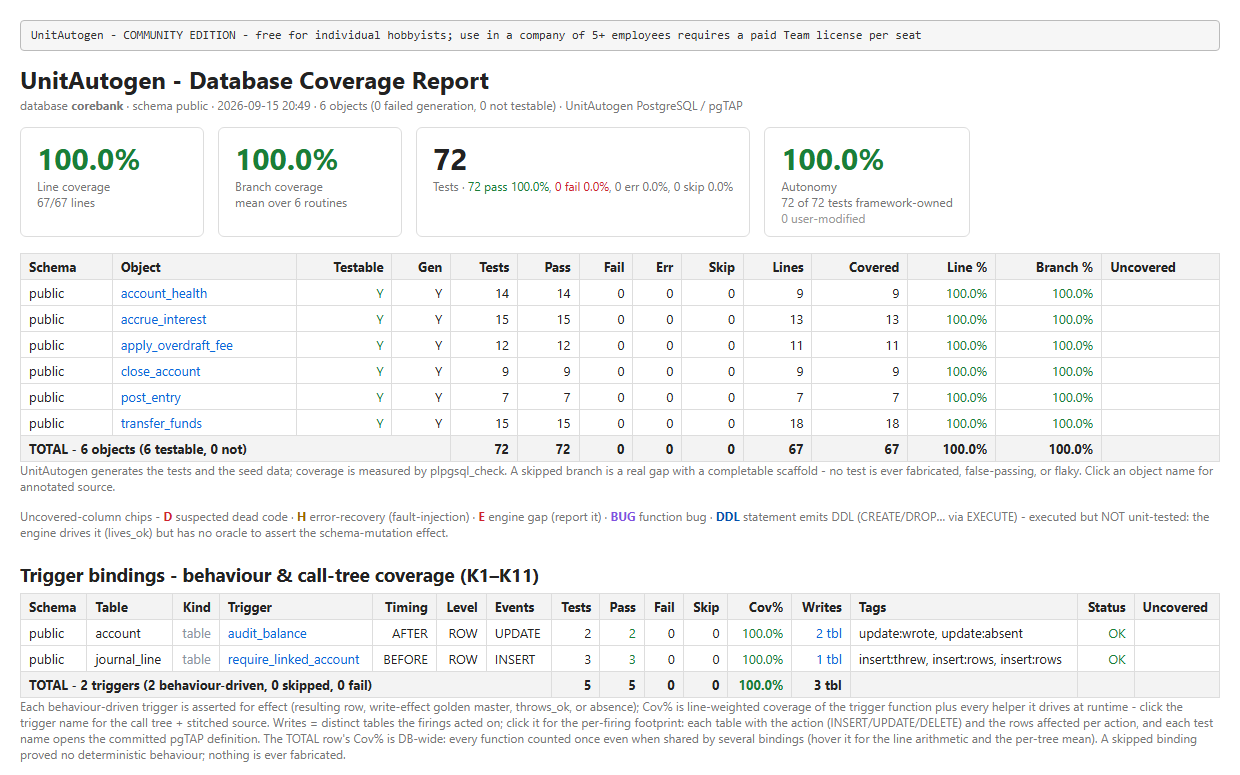
| Report element | What it shows |
|---|---|
| Line coverage | The share of executable lines the generated tests ran, for example 16 of 16 lines. |
| Branch coverage | The mean, across all routines, of the true and false decision outcomes the tests drove. |
| Tests | Generated tests, split into pass, fail, error and skip. Fail is always 0. Skip counts the scaffolds left for you to fill in. |
| Autonomy | How many tests are generated as they are and how many you have edited. |
| Per-routine row | Testable and Gen, the pass, fail, error and skip counts, lines covered, line %, branch % and the uncovered tags. |
| Uncovered tags | D suspected dead code, H error recovery, E tool limit, BUG a function bug, DDL a statement that emits DDL, Q a query condition not exercised on the test data. See Reading the report. |
| Trigger bindings | One row per trigger with its timing, level and events, the tests and their results, the trigger's own coverage, the tables it writes, behaviour tags such as update:wrote and its status. A trigger with no provable behaviour is skipped, never asserted vacuously. |
| Click a routine | The write footprint per test, the query arms measured on the test data and the annotated source, each line coloured by whether it ran, with hit counts. |
A generated trigger test drives the change and asserts what the trigger did. For the audit trigger above, the test fires an update and checks the exact audit row it wrote.
-- generated: test_trg_account__audit_balance
UPDATE public.account SET balance = 1;                       -- Act: fire the trigger
RETURN NEXT is(
    (SELECT ... "action" FROM public.audit_log),
    '[{"action": "balance_change"}]'::jsonb,                 -- Assert: the row the trigger wrote
'audit_balance :: update write-effect on public.audit_log');Click a routine or trigger name in the report to open its coverage detail. This is where you see how a routine is covered and what to do about a gap.
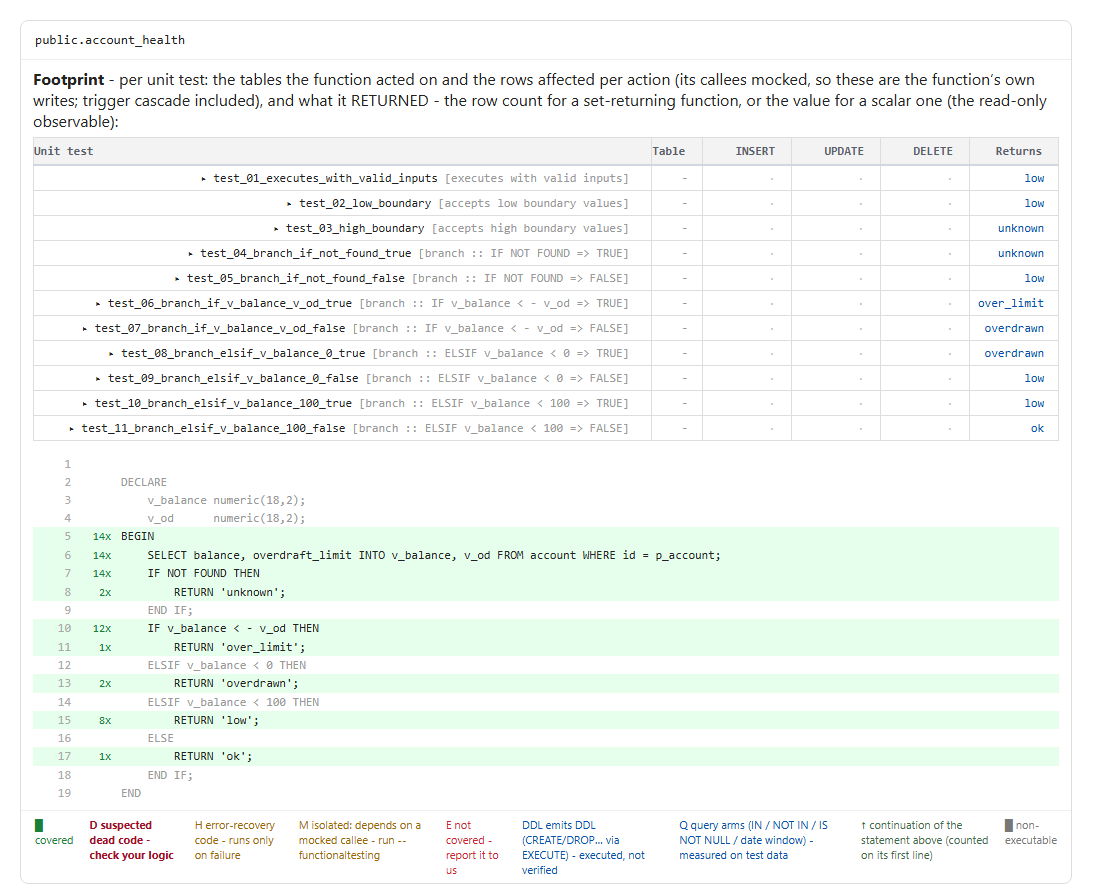
Read the annotated source from the top. A green line ran, and its hit count says how many tests drove it. A red line never ran, and its tag says whether it is a suspected bug, error-recovery code or a tool limit. The footprint shows which input produced which result, so you can confirm each branch returns what it should. If you change the code, the tests that pinned those values fail. See the worked example.
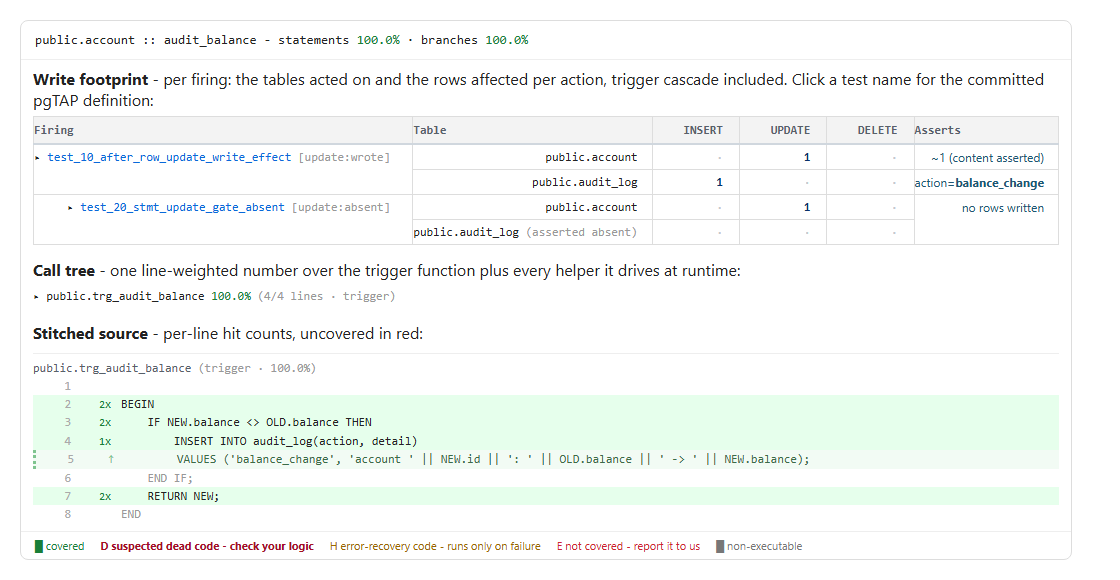
A trigger drill-down shows what each firing changed, and what it correctly left alone. The stitched source covers the trigger function and every helper it calls, so an uncovered line is a firing you have not provoked yet. Click a test name in either drill-down to open its pgTAP definition.
D line is a contradiction in your logictest_*.sql files so CI re-runs them on every change